Platform · How it fits in Epic
In your Epic worklist, through your own Epic build
Aurifex reads data through standard interfaces, shows its results where case managers and physicians already work, and files nothing until a person approves it. Here's exactly where it appears, what it reads and what your IT team sets up.
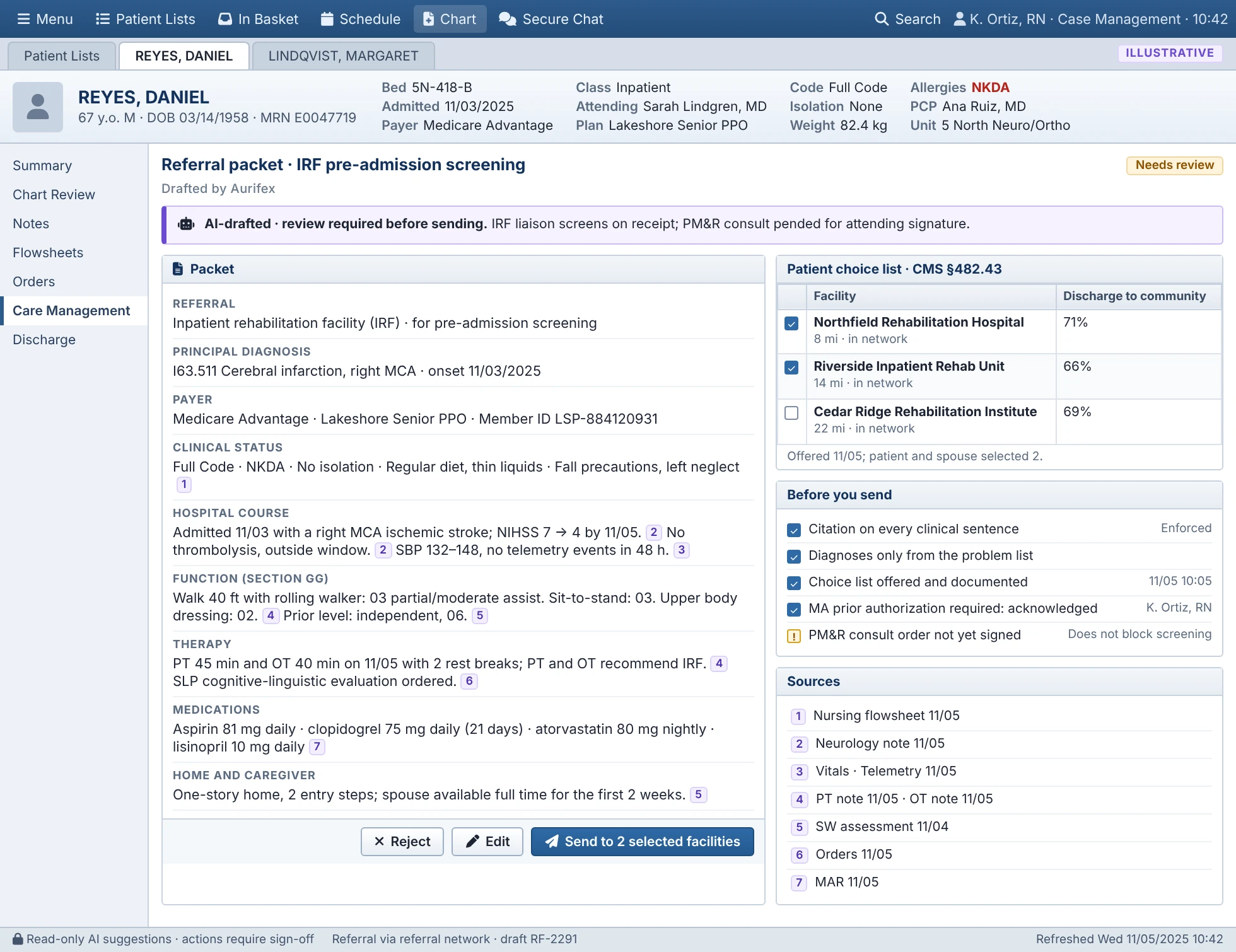
Integration status. Runs inside your Epic workflow through standard interfaces and your own Epic build. It isn't an app hosted by Epic, and we don't claim any Epic partnership or listing. Assumes Epic Hyperspace with the Case Management activities; your analysts' build time is in the IT effort table.
Where it appears
Daily work stays in Epic for case managers, nurses and physicians. The outcomes dashboard is a separate reporting site for leaders.
| Where | What people see | Who |
|---|---|---|
| Case-management worklist | Model expected discharge date, anticipated disposition, Possible IRF flag and barrier columns beside your existing ones | Case managers, charge nurses |
| Discharge Planning activity in the chart | The IRF candidacy review and the drafted referral packet, with sources | Case managers, social workers |
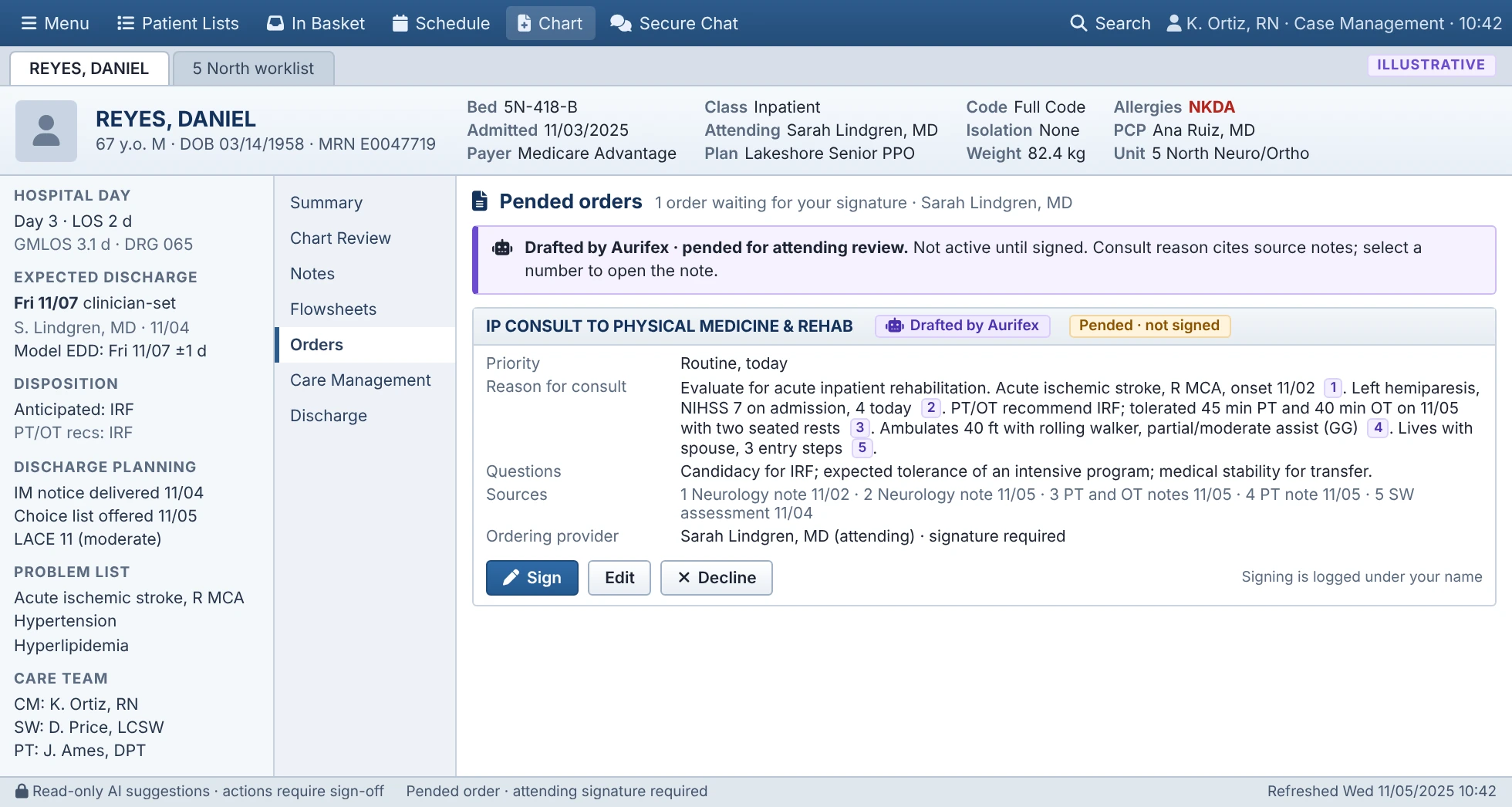
| Pended orders | The drafted PM&R consult, waiting for the attending to sign | Attending physicians |
| Review worklist built by your Epic analyst | Sampled drafts for clinician review, with patients hidden | Clinician reviewers |
| Unit capacity view | Expected discharges by day and avoidable-day barriers | Unit leaders, huddle leads |
| Outcomes dashboard (separate reporting site) | Aggregate results against baseline | Executives, finance, quality |
Data in, through standard interfaces only
- HL7 v2 ADT feed. Admit, transfer and discharge events, so Aurifex knows the moment a patient arrives, moves or leaves.
- FHIR R4 APIs. Encounters, conditions, observations such as vital signs and labs, medication orders, coverage, and clinical notes as documents.
Each part of the system requests only the data its task needs. The discharge model reads structured data. The note-reading service reads notes only for the patients it reviews, and nothing else.
Data out, only after a person approves
| What it writes back | How | Who approves |
|---|---|---|
| Model date, disposition and Possible IRF flag | Read-only display columns labeled as Aurifex suggestions | No approval needed. They never overwrite clinician fields |
| PM&R consult | A pended order, filed through Epic's FHIR ServiceRequest API where your instance licenses it, otherwise through an HL7 v2 ORM interface your analyst configures | The attending signs or declines |
| Referral packet | Sent through your referral platform and filed to the chart as a document (no ClinDoc note is created) | The case manager |
| Barrier updates | Synced to your discharge-barrier fields | The barrier's owner |
- Display fields such as the model date and the IRF flag are labeled as Aurifex suggestions and never overwrite clinician fields.
- Orders are pended for a physician to sign. Aurifex never signs an order.
- Notes and referral packets are filed or sent only when the case manager approves them, under that person's name.
The AI never writes directly to the chart. Every write-back starts with a named person's approval and is logged.
Sign-in and access
- Single sign-on through your identity provider with SAML 2.0 or OpenID Connect.
- Role-based access mapped to your existing roles, so people see in Aurifex what they can already see in Epic.
- Separate service identities for the model and agents, each with the least privilege its task needs.
- A full audit trail of every read, draft, edit, approval and rejection.
More on security, data handling and our commitments is on the Trust and AI safety page.
What your IT team sets up
| Task | Who usually does it |
|---|---|
| Approve the app and grant FHIR API access | Epic interface or integration analyst |
| Route an ADT feed to Aurifex | Interface engine team |
| Set up single sign-on | Identity and access team |
| Build 3 Care Management worklist columns, 1 review activity, 1 report and 1 SmartText for the referral packet | Epic Care Management analyst |
| Security and privacy review, and the business associate agreement | Information security, privacy and legal |
Supported on Epic 2023 and later. Everything is built and tested in your non-production environment first. The model and agents then run in silent mode on live data before anyone sees a result. See the pilot timeline.
Architecture
A detailed architecture review, including data flows and hosting, is available to your security team on request.
Epic is a trademark of Epic Systems Corporation. Aurifex is not affiliated with or endorsed by Epic.

See Aurifex on your own discharge workflow
We'll walk through your worklist, a drafted referral and how a pilot would be measured on your units.