Solutions · Case management
Review and send, instead of starting from scratch
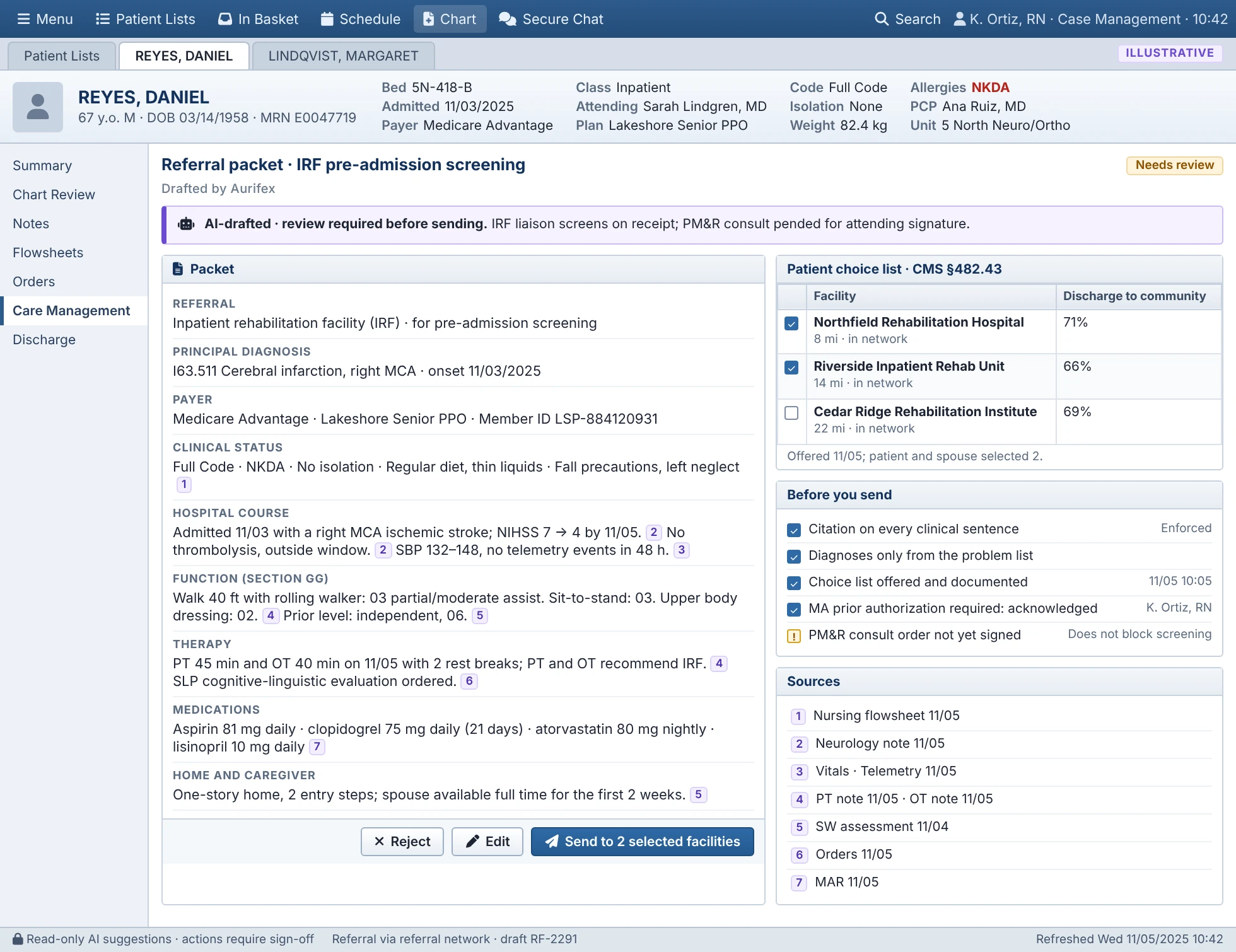
Flags arrive in your worklist with the evidence summarized and the referral drafted. You read it, fix what needs fixing and send it to the facilities your patient chose. Every statement links to the note it came from.
A day with Aurifex
A typical day for a case manager on a pilot unit. Your own huddle times and steps stay the same.
- HuddleThe unit view lists who is expected out today and tomorrow, who is past their expected date and every open barrier with its owner.
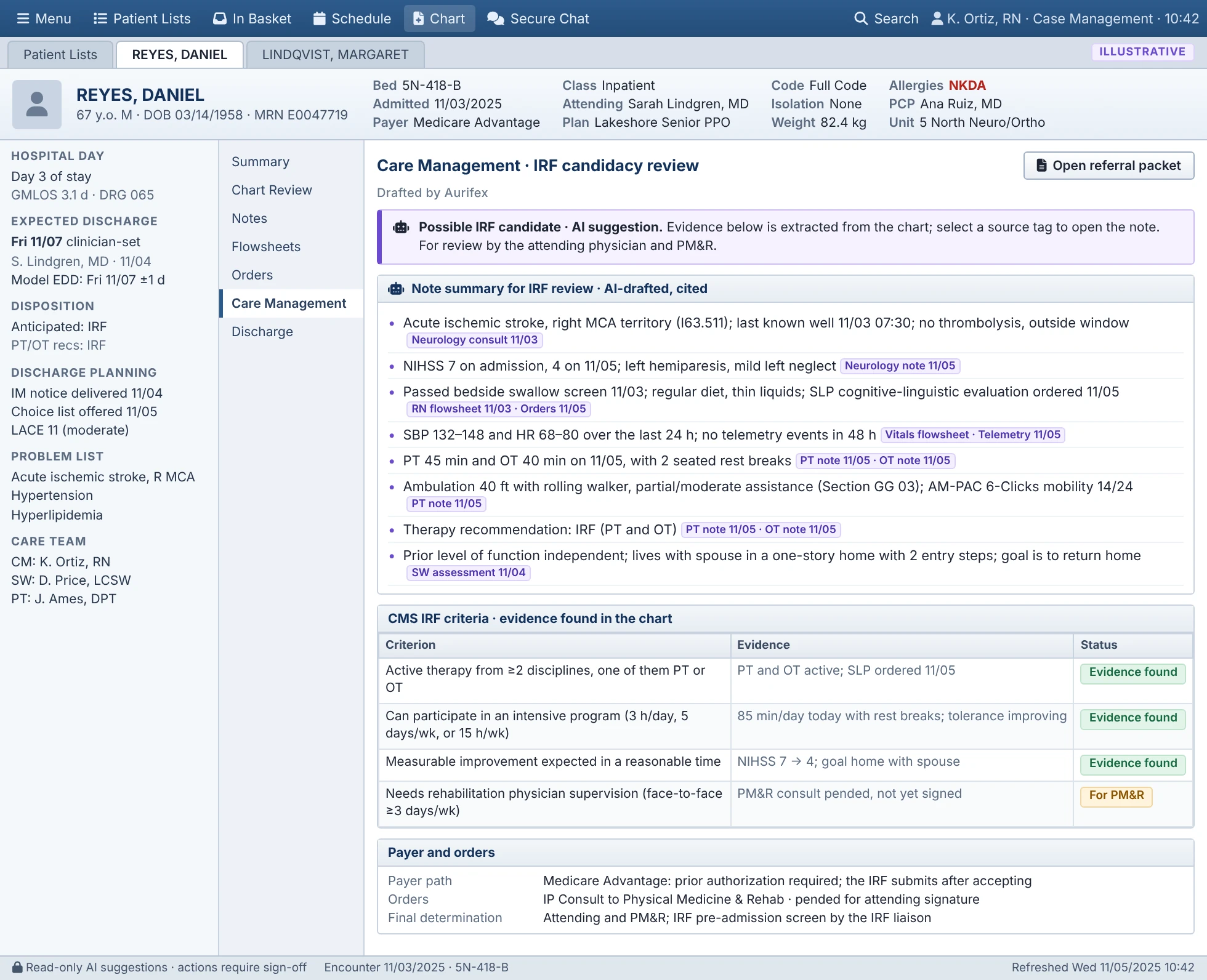
- WorklistThe model's expected date sits beside the clinician's for each patient. New Possible IRF flags are at the top, each with a cited summary.
- Review and sendOpen a drafted referral, check the sources, edit what needs it, confirm the patient's choices and send it through your referral platform. Most days that is one to three drafted referrals, and a pilot measures this on your units. The rest of your day is SNF, home health, payer and family work Aurifex doesn't draft.
- Authorizations and barriersMedicare Advantage and commercial authorizations show as barriers with their age, and you chase them as you do today. Peer-to-peer reviews and appeals stay with your utilization review team. Bed offers and equipment deliveries are followed up from the same list.
- Tomorrow's planExpected discharges for tomorrow are confirmed, and anything still open has an owner and a next step.
Flags raised overnight or on a weekend wait in the worklist for the next case-management shift. If a candidate isn't flagged, nothing changes: you refer through your usual process, and Aurifex never removes a patient from your list.
What changes, and what stays yours
What you stop doing
- Reading days of notes to find function, therapy tolerance and stability
- Building each rehab referral packet by hand, typically about 45 minutes a patient
- Keeping a separate list of barriers outside the worklist
What stays yours
- What's sent, to which facilities and when, under your name
- Every conversation with patients and families about their choices
- Editing or rejecting any draft, or writing your own
- Payer calls, peer-to-peer requests and judgment calls
When a draft gets something wrong, mark it in the review. Marked drafts are reviewed with you weekly. In testing, 1.5% of reviewed draft statements weren't supported by their cited source, which is why you read every draft before it goes out.
Who does what on a unit
| Role | With Aurifex |
|---|---|
| RN case manager | Reviews Possible IRF flags, edits and sends the inpatient rehab referral, and works the barriers they own |
| Social worker | Keeps SNF placement, payer and psychosocial work, using the anticipated disposition to start earlier |
| Charge nurse or unit leader | Runs the huddle from the unit view and assigns barriers the unit owns |
Caseload assignments don't change. Barriers sync to the discharge-barrier fields you already document in, so nothing is documented twice.
What you see
- Worklist columns for the model's expected discharge date, the anticipated disposition and the Possible IRF flag, next to your own columns.
- The candidacy review with a cited summary, the CMS IRF criteria and the payer path for your patient's plan.
- The referral packet with numbered sources, the patient choice list and checks before sending. Sending is blocked until required steps, such as acknowledging a Medicare Advantage authorization, are done.
- Avoidable days by reason code, such as a pending SNF bed offer, authorization or equipment delivery, each with an owner and an age.
Skilled nursing and home health
Inpatient rehab is usually a minority of a case manager's referrals, so the time saved on packets applies to those. For the rest, here's what Aurifex is designed to do.
| Work | Designed to do | Not yet |
|---|---|---|
| Anticipated disposition | Home, home health, SNF, IRF or long-term acute care, so planning starts early | — |
| SNF and home health referrals | Barrier tracking, bed offers and authorization age | Drafted SNF or home health packets. These go through your usual process |
| Authorizations | Status and days waiting, as a barrier with an owner. The payer path shows whether the plan requires prior authorization for IRF and which clinicals it asks for; payer rules are maintained with your utilization review team | Submitting to a payer or handling peer-to-peer reviews. Those stay with you |
Training
- Short sessions at huddles. About 30 minutes for each role, not long classroom time, plus two supervised shifts with support beside you and a check-in at week 2.
- Tip sheets. For case managers, physicians and unit leaders.
- Support on the unit at go-live. Plus a direct line to us for questions after.
- What to watch for. In testing, 1.5% of reviewed draft statements weren't supported by their source, so training covers checking sources before sending.
In testing

See Aurifex on your own discharge workflow
We'll walk through your worklist, a drafted referral and how a pilot would be measured on your units.